セキュリティの強化とユーザーエクスペリエンスの向上を目的として、F5 NGINX Plus(R29以降)はSecurity Assertion Markup Language(SAML)をサポートするようになりました。SAMLは、Webアプリケーションにシングルサインオン(SSO)を提供する確立されたプロトコルです。アイデンティティプロバイダー(IdP)がリソースへのアクセスを求めるユーザーを認証し、その情報をサービスプロバイダー(SP)に渡して認可できるようにします。
このブログ記事では、SAMLをネイティブにサポートしていないWebアプリケーションを使用して、NGINXをMicrosoft Entra ID(旧称Azure Active Directory(Azure AD))と統合する方法を手順に沿って説明します。また、このアプリケーションにSSOを実装し、Microsoft Entra IDエコシステムと統合する方法も取り上げます。このチュートリアルでは、NGINXがSAMLアサーションからクレーム(UPN、名、姓、グループメンバーシップなど)を抽出し、HTTPヘッダーを介してアプリケーションに渡す方法についても説明します。
このチュートリアルは、次の3つのステップで構成されています。
- Microsoft Entra IDをIdPとして構成
- SAML設定とリバースプロキシとしてのNGINX Plusの構成
- 構成のテスト
このチュートリアルを完了するには、以下が必要です。
- NGINX Plus(R29以降)。30日間の無料トライアルをご利用いただけます
- 無料またはエンタープライズのMicrosoft Entra IDアカウント
- NGINX Plusサーバーにインストールされた有効なSSL/TLS証明書(このチュートリアルでは「
dev.sports.com.crt and dev.sports.com.key」を使用) - SAMLアサーションを検証するために、IdPから公開証明書「
demonginx.cer」をダウンロードします
注記:このチュートリアルはNGINX Open Source環境には適用されません。キーバリューストアはNGINX Plus専用の機能です。
NGINX PlusをSAMLサービスプロバイダーとして使用する
この構成では、NGINX PlusはSAML SPとして機能し、ユーザーエージェントを介してNGINX Plusと間接的に通信するSAML IdPを使用したSSO実装に参加できます。
以下の図は、SP起動と、リクエストおよびレスポンスに対するPOSTバインディングを使用したSSOプロセスフローを示しています。この通信チャネルは直接的なものではなく、ユーザーエージェントを介して管理される点に、改めて注意することが重要です。
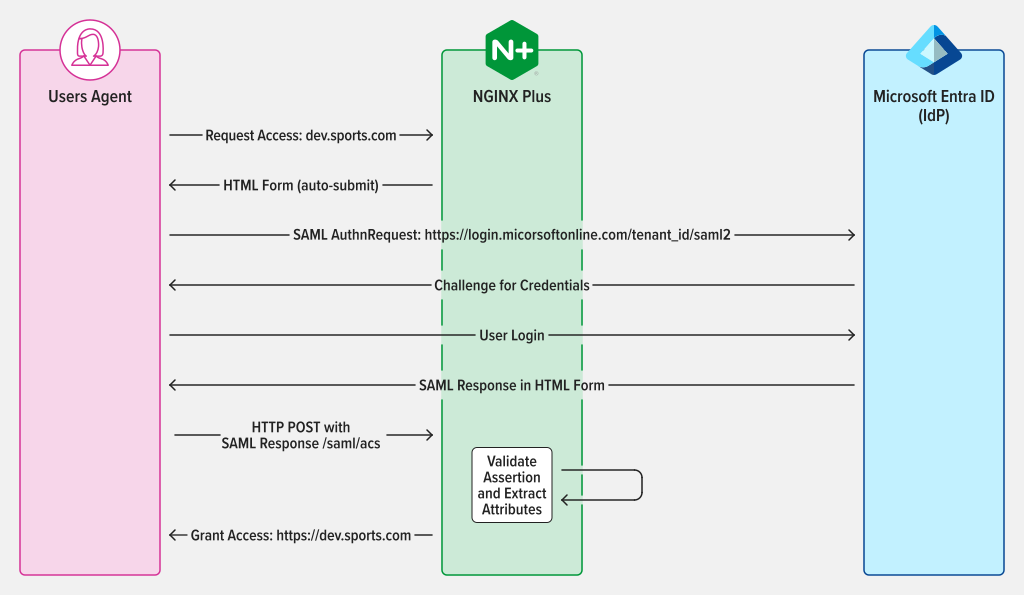
図1:AuthnRequestおよびResponseにPOSTバインディングを使用したSAML SP起動SSO
ステップ1:Microsoft Entra IDをアイデンティティプロバイダーとして構成
Microsoft Entra ID管理ポータルにアクセスするには、サインインして左側のパネルに移動します。[Microsoft Entra ID]を選択し、SSOの構成が必要なディレクトリのタイトルをクリックします。選択したら、[Enterprise applications]を選択します。
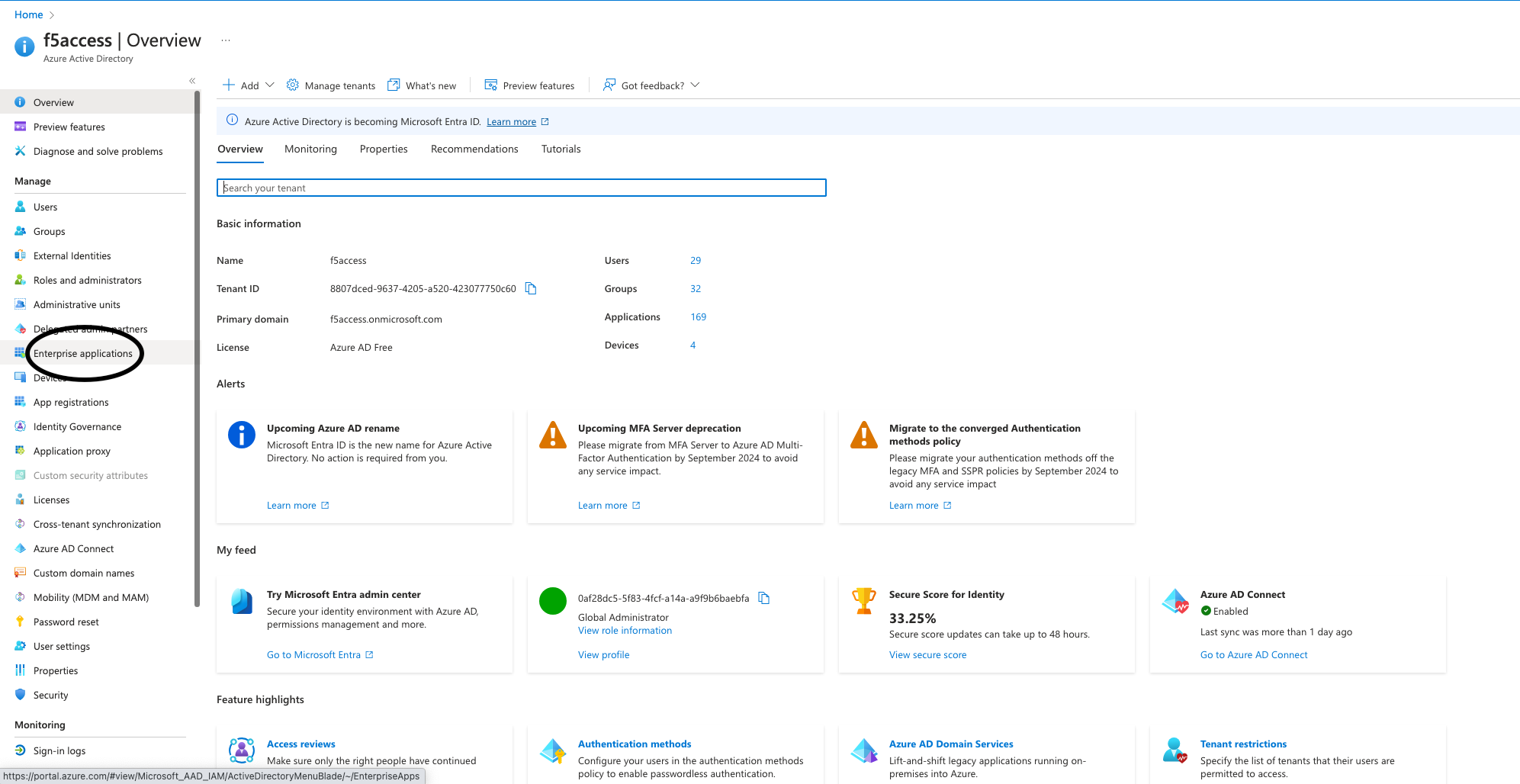
図2:管理ポータルで[Enterprise applications]を選択
アプリケーションを作成するには、ポータル上部の[New application]ボタンをクリックします。この例では、「demonginx」というアプリケーションを作成しました。
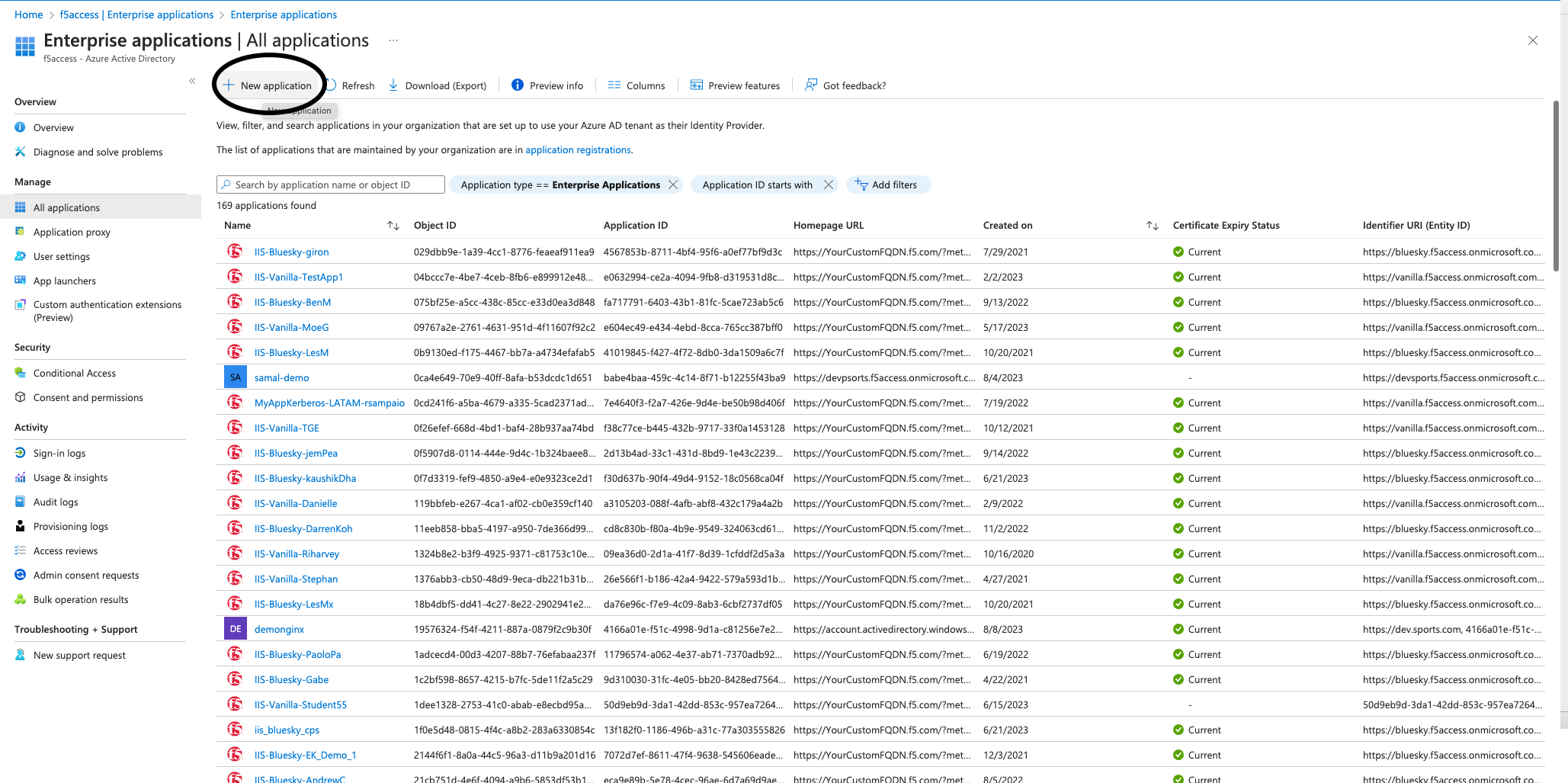
図3:Microsoft Entra IDでの新しいアプリケーションの作成
新しく作成したアプリケーションの[概要]にリダイレクトされたら、左側のメニューから[はじめに]に移動し、[管理]の[シングル サインオン]をクリックします。次に、[SAML]を[シングル サインオン方式]として選択します。
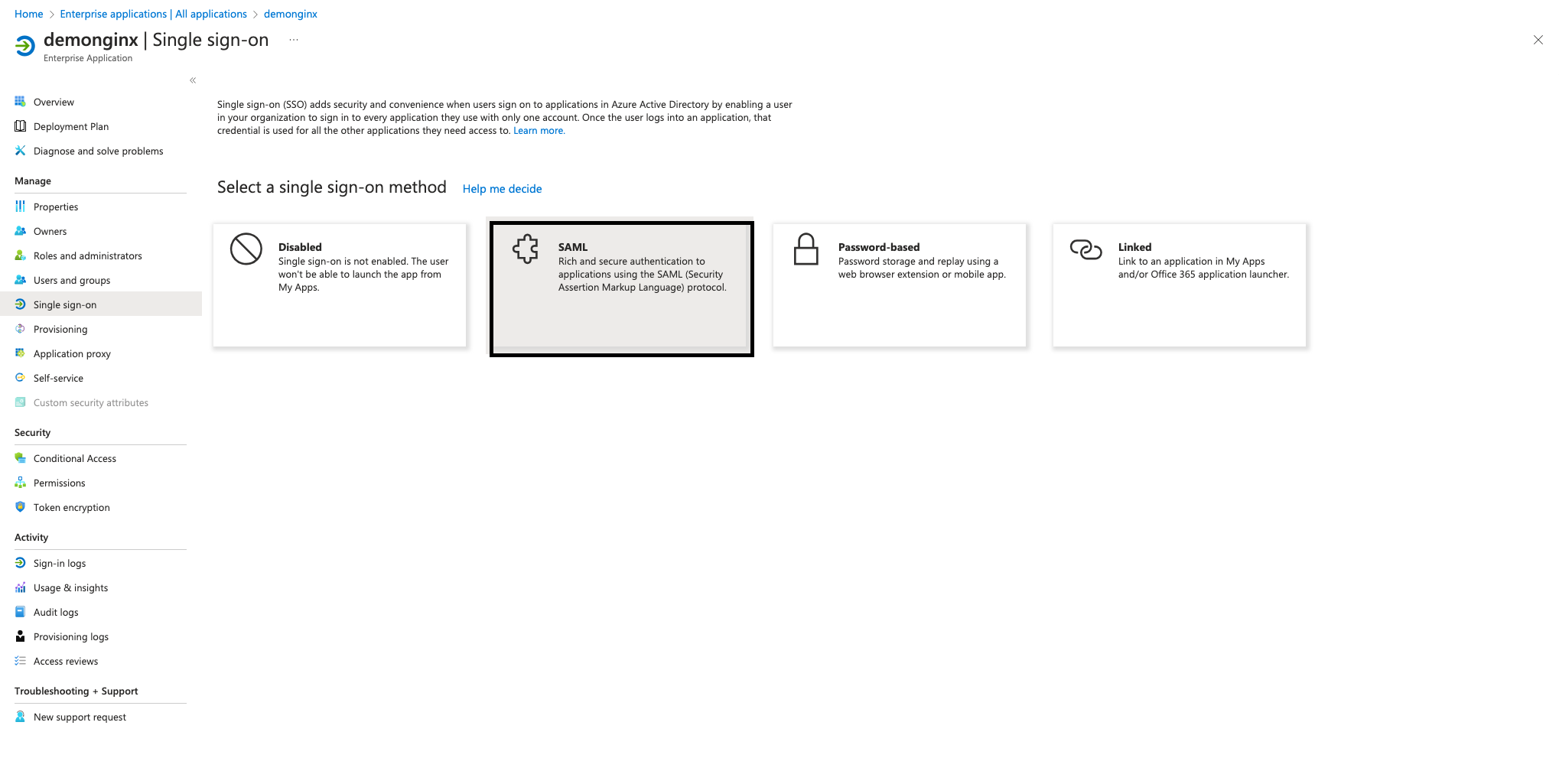
図4:SSOセクションからSAMLの構成を開始
エンタープライズアプリケーションでSSOを設定するには、NGINX PlusをSPとしてMicrosoft Entra IDに登録する必要があります。そのためには、図5に示すように、[編集]([基本的なSAML構成])の横にある鉛筆アイコンをクリックします。
次の値を追加し、[保存]をクリックします。
- 識別子(エンティティID) – https://dev.sports.com
- 応答URL(Assertion Consumer Service URL) – https://dev.sports.com/saml/acs
- サインオンURL: https://dev.sports.com
- ログアウトURL(任意): https://dev.sports.com/saml/sls
検証証明書の使用は任意です。この設定を有効にする場合は、NGINXの2つの設定オプションを構成する必要があります。
- 公開鍵で署名を検証するには、
$saml_sp_sign_authnをtrueに設定する必要があります。これにより、SPはIdPに送信するAuthnRequestに署名します。 - この署名に使用する秘密鍵のパスを指定するには、
$saml_sp_signing_keyを設定します。署名を検証できるよう、対応する公開鍵証明書をMicrosoft Entra IDに必ずアップロードしてください。
注記:このデモでは、属性とクレームが変更され、新しいSAML属性が追加されています。これらのSAML属性はIdPから送信されます。これらの属性を適切に受信して処理できるように、NGINXの設定を構成してください。関連する設定は、NGINX GitHubリポジトリで確認および調整できます。
IdPの証明書(未加工)をMicrosoft Entra IDからダウンロードし、NGINX Plusインスタンスに保存します。
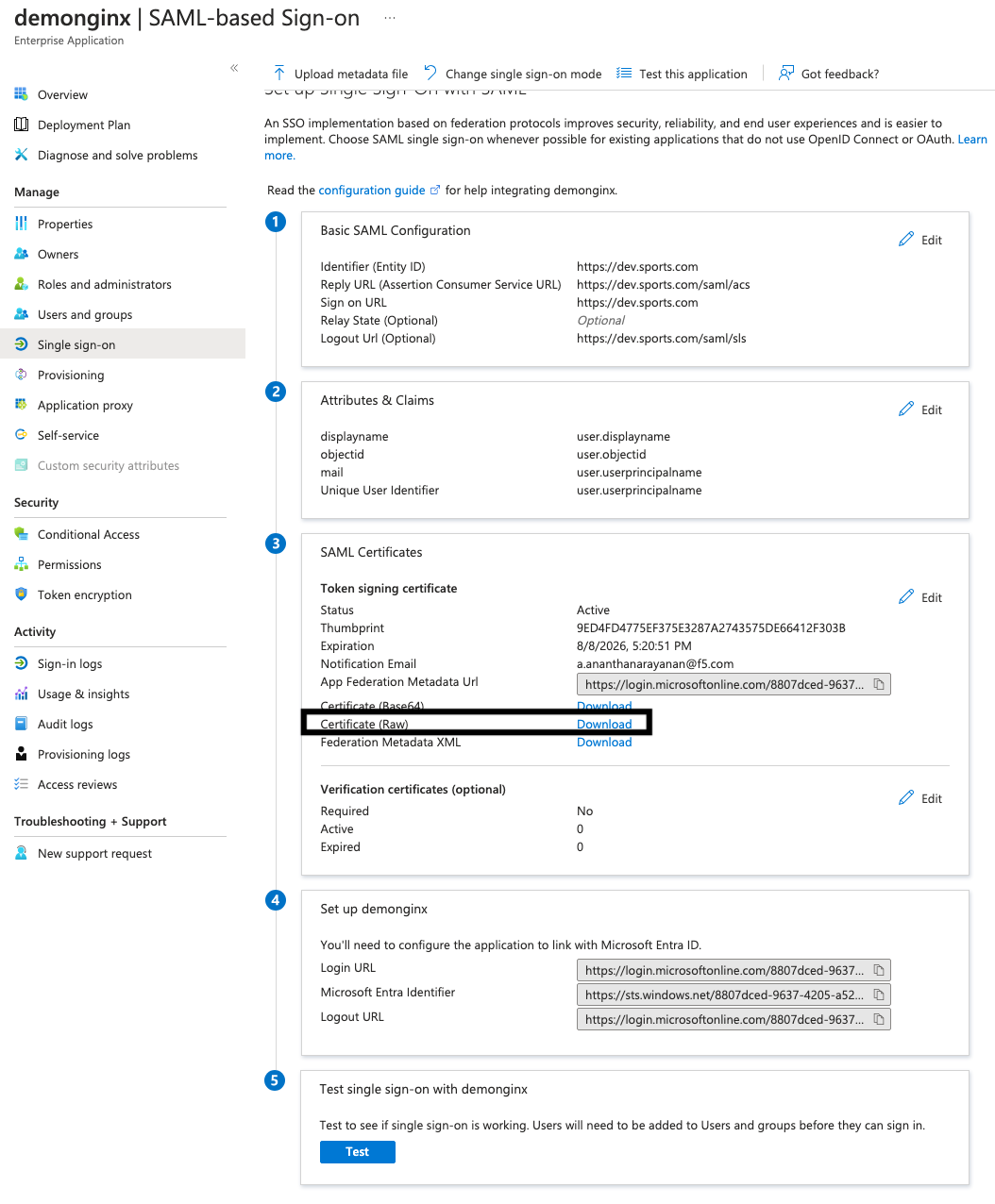
図5:Microsoft Entra IDからのIdP証明書(未加工)のダウンロード
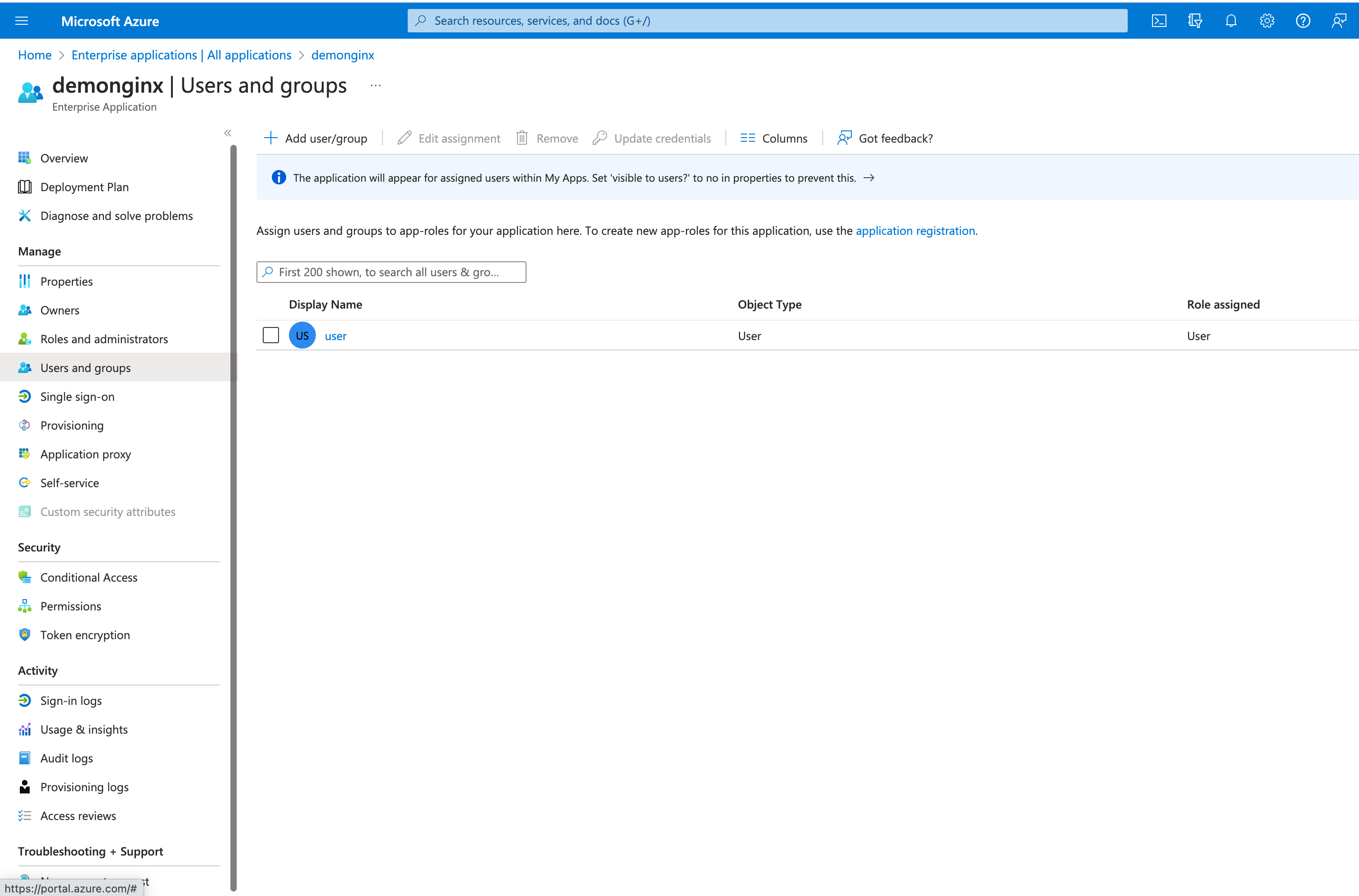
図6:新しいユーザーまたはグループの追加
Microsoft Entra IDでは、ユーザーやグループを追加または割り当てることで、SSOが有効な社内アプリケーションへのアクセス権を付与できます。
On the left-hand menu, click User and groups and then the top button Add user/group.
ステップ2:SAML設定を構成し、NGINX Plusをリバースプロキシとして設定する
NGINX Plus SPでファイルを設定する前に、必要な証明書が用意されていることを確認してください。
- TLSセッションを終端するための証明書(
dev.sports.com.crt and dev.sports.com.key) - IdP署名の検証用にMicrosoft Entra IDからダウンロードした証明書(
demonginx.cer)
注記:証明書はSPKI形式である必要があります。
この手順を開始するには、署名検証用のIdP証明書をMicrosoft Entra IDからダウンロードします。次に、PEM形式からDER形式に変換します。
openssl x509 -in demonginx.cer -outform DER -out demonginx.der
SAML SPアサーションを検証する場合は、TLS終端に使用するものとは異なる公開鍵/秘密鍵を使用することを推奨します。
公開鍵証明書をSPKI形式で抽出します:
openssl x509 -inform DER -in demonginx.der -pubkey -noout > demonginx.spki
frontend.confファイルを編集し、次の項目を更新します。
ssl_certificate– TLS証明書のパスを含めるように更新します。ssl_certificate_key– TLS秘密鍵のパスを含めるように更新します。
本番環境へのデプロイでは、ビジネス要件に応じて異なるバックエンドの宛先を使用できます。この例では、バックエンドがカスタマイズされたレスポンスを返します:
「Applicationページへようこそn 私のオブジェクトIDは$http_objectidnです 私のメールアドレスは$http_mailnです」;
Microsoft Entra IDの属性とクレームを変更し、ユーザーの「mail」と「objectid」の新しいクレームを追加しました。これらの更新により、アプリケーションでユーザーに合わせた応答を提供できるようになり、ユーザーエクスペリエンスの向上につながります。
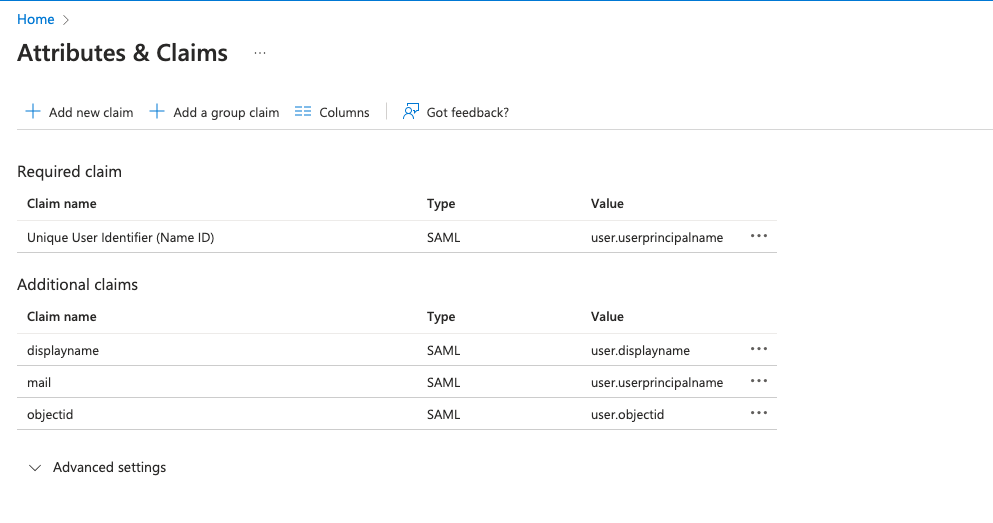
図7:Microsoft Entra IDで変更した属性とクレーム
次に、バックエンドアプリケーションへのトラフィックをプロキシするNGINXを設定します。このデモでは、バックエンドのSAMLアプリケーションはhttps://dev.sports.comで一般公開されています。
Edit your frontend.confファイルを編集します:
# This is file frontend.conf
# This is the backend application we are protecting with SAML SSO
upstream my_backend {
    zone my_backend 64k;
    server dev.sports.com;
}

# Custom log format to include the 'NameID' subject in the REMOTE_USER field
log_format saml_sso '$remote_addr - $saml_name_id [$time_local] "$request" "$host" '
                    '$status $body_bytes_sent "$http_referer" '
                    '"$http_user_agent" "$http_x_forwarded_for"';

# The frontend server - reverse proxy with SAML SSO authentication
#
server {
    # Functional locations implementing SAML SSO support
    include conf.d/saml_sp.server_conf;


    # Reduce severity level as required
    error_log /var/log/nginx/error.log debug;
    listen 443 ssl;
    ssl_certificate     /home/ubuntu/dev.sports.com.crt;
    ssl_certificate_key  /home/ubuntu/dev.sports.com.key;
    ssl_session_cache shared:SSL:5m;


    location / {
        # When a user is not authenticated (i.e., the "saml_access_granted."
        # variable is not set to "1"), an HTTP 401 Unauthorized error is
        # returned, which is handled by the @do_samlsp_flow named location.
        error_page 401 = @do_samlsp_flow;

        if ($saml_access_granted != "1") {
            return 401;
        }

        # Successfully authenticated users are proxied to the backend,
        # with the NameID attribute passed as an HTTP header
        proxy_set_header mail $saml_attrib_mail;  # Microsoft Entra ID's user.mail
        proxy_set_header objectid $saml_attrib_objectid; # Microsoft Entra ID's objectid
        access_log /var/log/nginx/access.log saml_sso;
        proxy_pass http://my_backend;
        proxy_set_header Host dev.sports.com;
        return 200 "Welcome to Application pagen My objectid is $http_objectidn My email is $http_mailn";
        default_type text/plain;

   }
}
# vim: syntax=nginx
属性「saml_attrib_mail」と「saml_attrib_ objectid」をNGINXの設定に反映するには、saml_sp_configuration.confのキーバリューストア部分を次のように更新します。
keyval_zone    zone=saml_attrib_mail:1M                state=/var/lib/nginx/state/saml_attrib_email.json   timeout=1h;
keyval   $cookie_auth_token $saml_attrib_mail    zone=saml_attrib_mail;

 keyval_zone zone=saml_attrib_objectid:1M            state=/var/lib/nginx/state/saml_attrib_objectid.json   timeout=1h;
keyval   $cookie_auth_token $saml_attrib_objectid   zone=saml_attrib_objectid;
次に、SAML SSO設定ファイルを構成します。このファイルには、SPとIdPの主要な設定が含まれています。ご利用のSPとIdPの構成に合わせてカスタマイズするには、ファイル内の複数のmap{}ブロックを調整する必要があります。
次の表では、saml_sp_configuration.conf内の変数について説明します。
| 変数 | 説明 |
|---|---|
saml_sp_entity_id | ユーザーがアプリケーションへのアクセスに使用するURL。 |
saml_sp_acs_url | サービスプロバイダーがSAMLレスポンスを受信して処理し、ユーザーのIDを抽出したうえで、提供された情報に基づいて要求されたリソースへのアクセスを許可または拒否するために使用するURL。 |
saml_sp_sign_authn | SPからIdPへのSAMLリクエストに署名するかどうかを指定します。署名にはSPの署名鍵が使用されます。署名を検証するには、対応する証明書をIdPにアップロードする必要があります。 |
saml_sp_signing_key | SPからIdPへのSAMLリクエストの署名に使用する署名鍵。署名を検証するため、対応する証明書をIdPにアップロードしてください。 |
saml_idp_entity_id | IdPの定義に使用する識別子。 |
saml_idp_sso_url | 認証リクエストを開始するために、SPがSAMLアサーションリクエストを送信するIdPエンドポイント。 |
saml_idp_verification_certificate | IdPから受信した署名付きSAMLアサーションの検証に使用する証明書。この証明書はIdPから提供され、SPKI形式である必要があります。 |
saml_sp_slo_url | IdPが、ログアウトプロセスの開始時にSAML LogoutRequestを送信するか、ログアウトの確認時にLogoutResponseを送信するSPエンドポイント。 |
saml_sp_sign_slo | ログアウト用SAMLにSPが署名するかどうかを指定します。 |
saml_idp_slo_url | SPが、ログアウトプロセスの開始時にLogoutRequestを送信するか、ログアウトの確認時にLogoutResponseを送信するIdPエンドポイント。 |
saml_sp_want_signed_slo | SAML SPが、IdPからのSAMLログアウトレスポンスまたはリクエストへの署名を要求するかどうかを指定します。 |
以下のコードは、このユースケース向けにsaml_sp_configuration.confで編集した値のみを示しています。
注記:構成ファイルの残りの部分(キーと値のストアなど)が引き続きファイル内に含まれていることを確認してください。また、導入環境に応じて、saml_sp_configuration.confファイル内の変数を適切に調整してください。
 # SAML SSO configuration

map $host $saml_sp_entity_id {
    # Unique identifier that identifies the SP to the IdP.
    # Must be URL or URN.
    default "https://dev.sports.com";
}

map $host $saml_sp_acs_url {
    # The ACS URL, an endpoint on the SP where the IdP
    # will redirect to with its authentication response.
    # Must match the ACS location defined in the "saml_sp.serer_conf" file.
    default "https://dev.sports.com/saml/acs";
}

map $host $saml_sp_request_binding {
    # Refers to the method by which an authentication request is sent from
    # the SP to an IdP during the Single Sign-On (SSO) process.
    # Only HTTP-POST or HTTP-Redirect methods are allowed.
    default 'HTTP-POST';
}

map $host $saml_sp_sign_authn {
    # Whether the SP should sign the AuthnRequest sent to the IdP.
    default "false";
}

map $host $saml_sp_decryption_key {
    # Specifies the private key that the SP uses to decrypt encrypted assertion
    # or NameID from the IdP.
    default "";
}

map $host $saml_sp_force_authn {
    # Whether the SP should force re-authentication of the user by the IdP.
    default "false";
}

map $host $saml_sp_nameid_format {
    # Indicates the desired format of the name identifier in the SAML assertion
    # generated by the IdP. Check section 8.3 of the SAML 2.0 Core specification
    # (http://docs.oasis-open.org/security/saml/v2.0/saml-core-2.0-os.pdf)
    # for the list of allowed NameID Formats.
    default "urn:oasis:names:tc:SAML:1.1:nameid-format:unspecified";
}

map $host $saml_sp_relay_state {
    # Relative or absolute URL the SP should redirect to
    # after successful sign on.
    default "";
}

map $host $saml_sp_want_signed_response {
    # Whether the SP wants the SAML Response from the IdP
    # to be digitally signed.
    default "false";
}

map $host $saml_sp_want_signed_assertion {
    # Whether the SP wants the SAML Assertion from the IdP
    # to be digitally signed.
    default "true";
}

map $host $saml_sp_want_encrypted_assertion {
    # Whether the SP wants the SAML Assertion from the IdP
    # to be encrypted.
    default "false";
}

map $host $saml_idp_entity_id {
    # Unique identifier that identifies the IdP to the SP.
    # Must be URL or URN.
    default "https://sts.windows.net/8807dced-9637-4205-a520-423077750c60/";
}

map $host $saml_idp_sso_url {
    # IdP endpoint that the SP will send the SAML AuthnRequest to initiate
    # an authentication process.
    default "https://login.microsoftonline.com/8807dced-9637-4205-a520-423077750c60/saml2";
}

map $host $saml_idp_verification_certificate {
    # Certificate file that will be used to verify the digital signature
    # on the SAML Response, LogoutRequest or LogoutResponse received from IdP.
    # Must be public key in PKCS#1 format. See documentation on how to convert
    # X.509 PEM to DER format.
    default "/etc/nginx/conf.d/demonginx.spki";
}

######### Single Logout (SLO) #########

map $host $saml_sp_slo_url {
    # SP endpoint that the IdP will send the SAML LogoutRequest to initiate
    # a logout process or LogoutResponse to confirm the logout.
    default "https://dev.sports.com/saml/sls";
}

map $host $saml_sp_slo_binding {
    # Refers to the method by which a LogoutRequest or LogoutResponse
    # is sent from the SP to an IdP during the Single Logout (SLO) process.
    # Only HTTP-POST or HTTP-Redirect methods are allowed.
    default 'HTTP-POST';
}

map $host $saml_sp_sign_slo {
    # Whether the SP must sign the LogoutRequest or LogoutResponse
    # sent to the IdP.
    default "false";
}

map $host $saml_idp_slo_url {
    # IdP endpoint that the SP will send the LogoutRequest to initiate
    # a logout process or LogoutResponse to confirm the logout.
    # If not set, the SAML Single Logout (SLO) feature is DISABLED and
    # requests to the 'logout' location will result in the termination
    # of the user session and a redirect to the logout landing page.
    default "https://login.microsoftonline.com/8807dced-9637-4205-a520-423077750c60/saml2";
}

map $host $saml_sp_want_signed_slo {
    # Whether the SP wants the SAML LogoutRequest or LogoutResponse from the IdP
    # to be digitally signed.
    default "true";
}

map $host $saml_logout_landing_page {
    # Where to redirect user after requesting /logout location. This can be
    # replaced with a custom logout page, or complete URL.
    default "/_logout"; # Built-in, simple logout page
}

map $proto $saml_cookie_flags {
    http  "Path=/; SameSite=lax;"; # For HTTP/plaintext testing
    https "Path=/; SameSite=lax; HttpOnly; Secure;"; # Production recommendation
}

map $http_x_forwarded_port $redirect_base {
    ""      $proto://$host:$server_port;
    default $proto://$host:$http_x_forwarded_port;
}

map $http_x_forwarded_proto $proto {
    ""      $scheme;
    default $http_x_forwarded_proto;
}
# ADVANCED CONFIGURATION BELOW THIS LINE
# Additional advanced configuration (server context) in saml_sp.server_conf

######### Shared memory zones that keep the SAML-related key-value databases

# Zone for storing AuthnRequest and LogoutRequest message identifiers (ID)
# to prevent replay attacks. (REQUIRED)
# Timeout determines how long the SP waits for a response from the IDP,
# i.e. how long the user authentication process can take.
keyval_zone zone=saml_request_id:1M                 state=/var/lib/nginx/state/saml_request_id.json                  timeout=5m;

# Zone for storing SAML Response message identifiers (ID) to prevent replay attacks. (REQUIRED)
# Timeout determines how long the SP keeps IDs to prevent reuse.
keyval_zone zone=saml_response_id:1M                state=/var/lib/nginx/state/saml_response_id.json                 timeout=1h;

# Zone for storing SAML session access information. (REQUIRED)
# Timeout determines how long the SP keeps session access decision (the session lifetime).
keyval_zone zone=saml_session_access:1M             state=/var/lib/nginx/state/saml_session_access.json              timeout=1h;

# Zone for storing SAML NameID values. (REQUIRED)
# Timeout determines how long the SP keeps NameID values. Must be equal to session lifetime.
keyval_zone zone=saml_name_id:1M                    state=/var/lib/nginx/state/saml_name_id.json                     timeout=1h;

# Zone for storing SAML NameID format values. (REQUIRED)
# Timeout determines how long the SP keeps NameID format values. Must be equal to session lifetime.
keyval_zone zone=saml_name_id_format:1M             state=/var/lib/nginx/state/saml_name_id_format.json              timeout=1h;

# Zone for storing SAML SessionIndex values. (REQUIRED)
# Timeout determines how long the SP keeps SessionIndex values. Must be equal to session lifetime.
keyval_zone zone=saml_session_index:1M              state=/var/lib/nginx/state/saml_session_index.json               timeout=1h;

# Zone for storing SAML AuthnContextClassRef values. (REQUIRED)
# Timeout determines how long the SP keeps AuthnContextClassRef values. Must be equal to session lifetime.
keyval_zone zone=saml_authn_context_class_ref:1M    state=/var/lib/nginx/state/saml_authn_context_class_ref.json     timeout=1h;

# Zones for storing SAML attributes values. (OPTIONAL)
# Timeout determines how long the SP keeps attributes values. Must be equal to session lifetime.
keyval_zone zone=saml_attrib_uid:1M                 state=/var/lib/nginx/state/saml_attrib_uid.json                  timeout=1h;
keyval_zone zone=saml_attrib_name:1M                state=/var/lib/nginx/state/saml_attrib_name.json                 timeout=1h;
keyval_zone zone=saml_attrib_memberOf:1M            state=/var/lib/nginx/state/saml_attrib_memberOf.json             timeout=1h;

######### SAML-related variables whose value is looked up by the key (session cookie) in the key-value database.

# Required:
keyval $saml_request_id     $saml_request_redeemed          zone=saml_request_id;               # SAML Request ID
keyval $saml_response_id    $saml_response_redeemed         zone=saml_response_id;              # SAML Response ID
keyval $cookie_auth_token   $saml_access_granted            zone=saml_session_access;           # SAML Access decision
keyval $cookie_auth_token   $saml_name_id                   zone=saml_name_id;                  # SAML NameID
keyval $cookie_auth_token   $saml_name_id_format            zone=saml_name_id_format;           # SAML NameIDFormat
keyval $cookie_auth_token   $saml_session_index             zone=saml_session_index;            # SAML SessionIndex
keyval $cookie_auth_token   $saml_authn_context_class_ref   zone=saml_authn_context_class_ref;  # SAML AuthnContextClassRef

# Optional:
keyval $cookie_auth_token   $saml_attrib_uid                zone=saml_attrib_uid;
keyval $cookie_auth_token   $saml_attrib_name               zone=saml_attrib_name;
keyval $cookie_auth_token   $saml_attrib_memberOf           zone=saml_attrib_memberOf;


keyval_zone    zone=saml_attrib_mail:1M                state=/var/lib/nginx/state/saml_attrib_mail.json   timeout=1h;
keyval         $cookie_auth_token $saml_attrib_mail    zone=saml_attrib_mail;

keyval $cookie_auth_token   $saml_attrib_objectid           zone=saml_attrib_objectid;
keyval_zone zone=saml_attrib_objectid:1M            state=/var/lib/nginx/state/saml_attrib_objectid.json             timeout=1h;


######### Imports a module that implements SAML SSO and SLO functionality
js_import samlsp from conf.d/saml_sp.js;
ステップ3:設定のテスト
構成をテストするには、次の2つが必要です:
- SAMLフローの検証
- SP主導のログアウト機能のテスト
SAMLフローの検証
NGINX Plusを使用してSAML SPを構成し、Microsoft Entra IDを使用してIdPを構成した後は、SAMLフローを検証することが重要です。この検証により、IdPを介したユーザー認証が成功し、SPで保護されたリソースへのアクセスが許可されることを確認できます。
SP起点のSAMLフローを確認するには、任意のブラウザーを開き、アドレスバーに「https://dev.sports.com」と入力します。IdPのログインページに移動します。
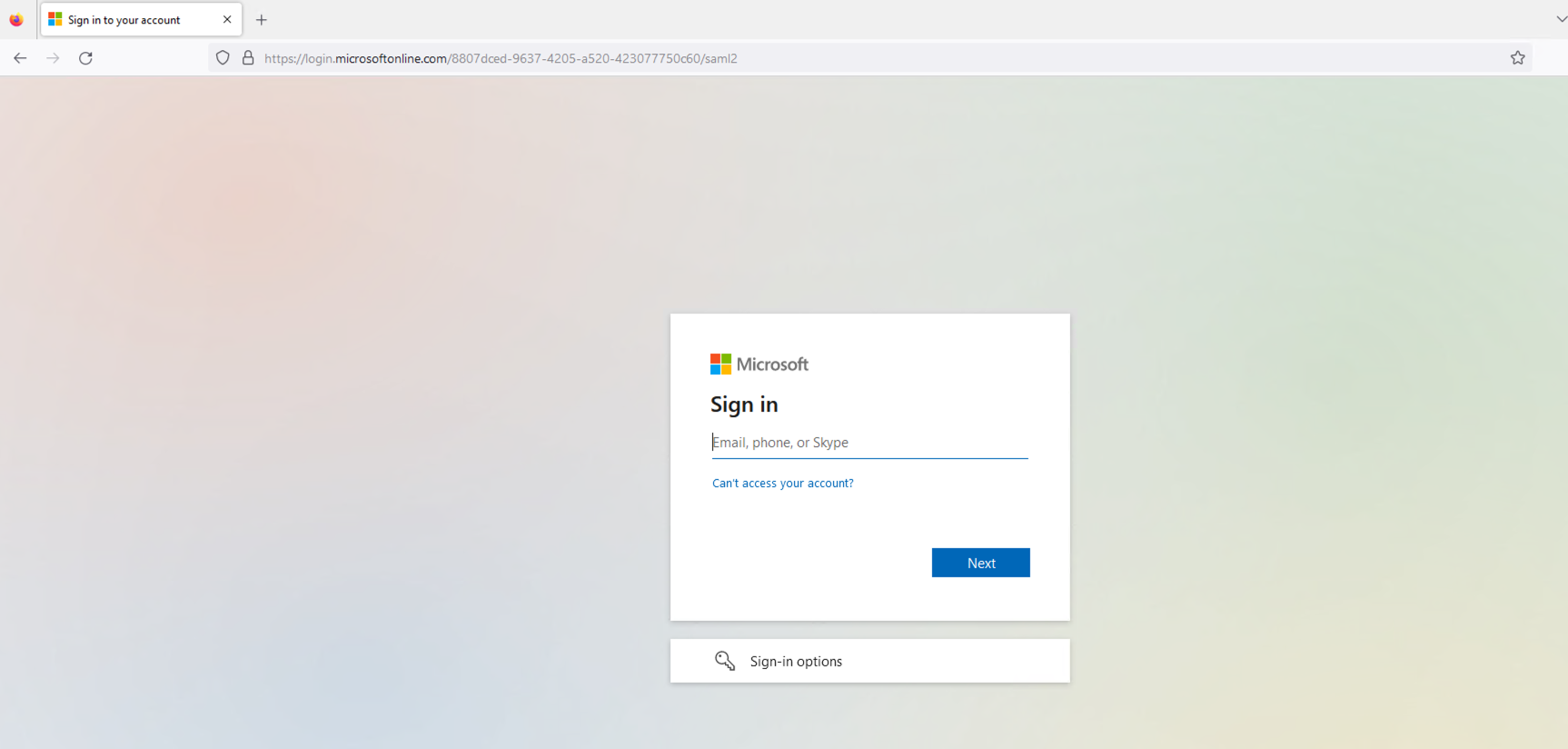
図8:IdPのログインページ
IdPのログインページで設定されているユーザーの認証情報を入力します。送信すると、IdPがユーザーを認証します。
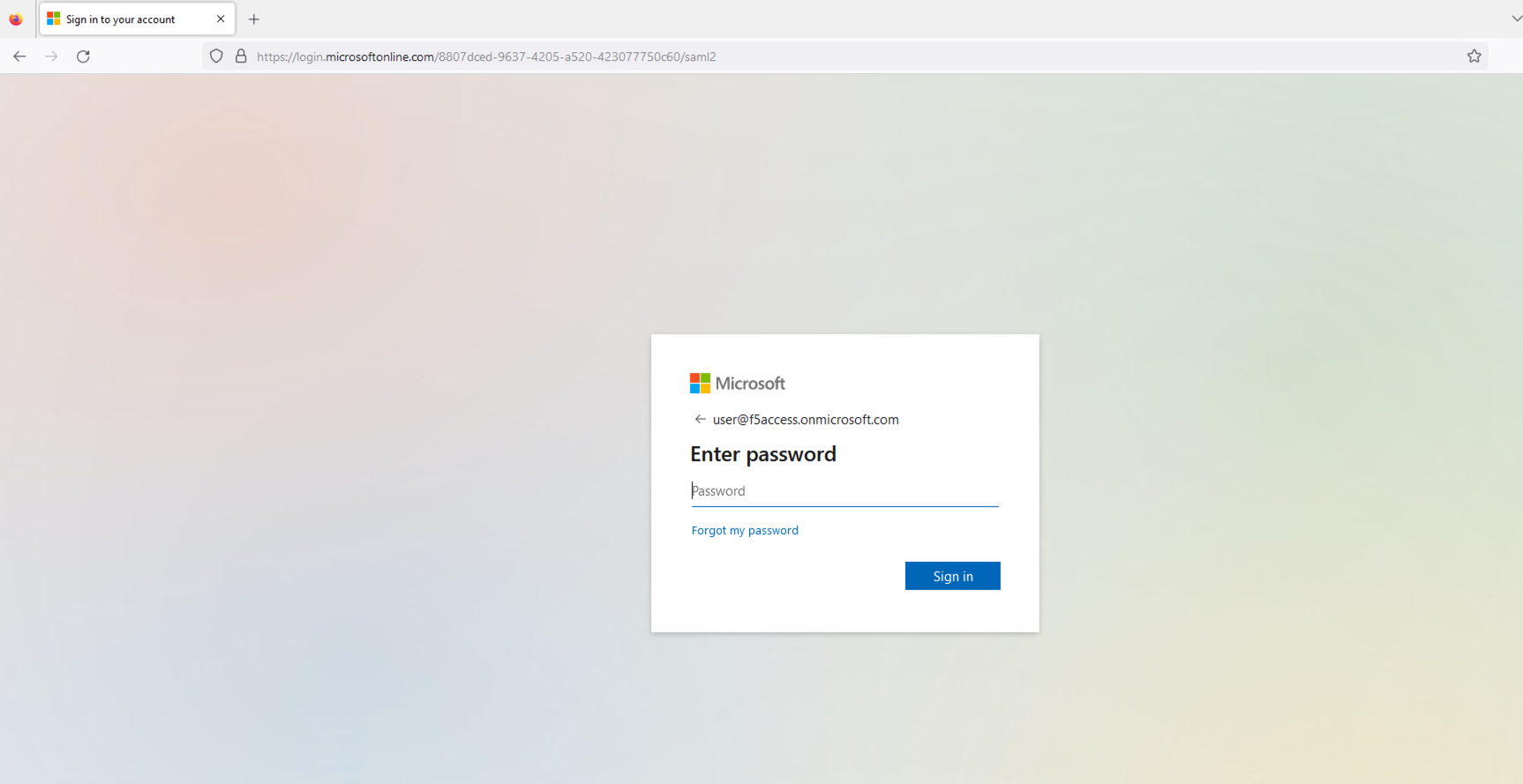
図9:設定済みユーザーの認証情報の入力
セッションが正常に確立されると、ユーザーには先ほど要求した保護対象リソースへのアクセスが許可されます。その後、そのリソースがユーザーのブラウザーに表示されます。
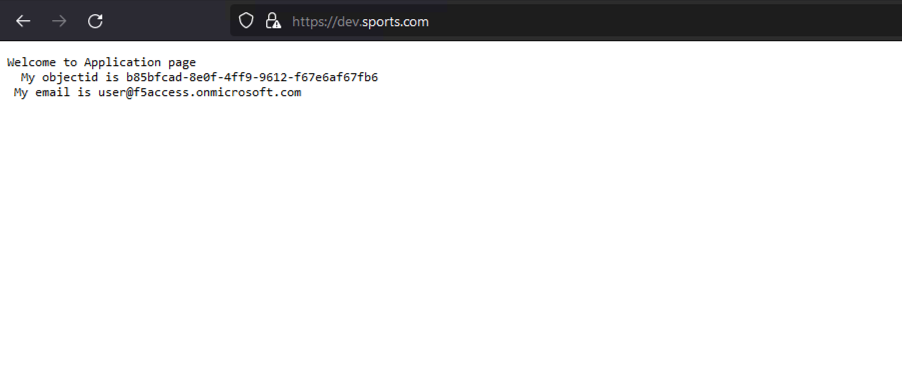
図10:正常に読み込まれたアプリケーションページ
SPとIdPのログを確認することで、SAMLフローに関する有用な情報を得られます。SP側(NGINX Plus)では、auth_token Cookieが正しく設定されていることを確認します。IdP側(Microsoft Entra ID)では、認証プロセスがエラーなく完了し、SAMLアサーションがSPに送信されていることを確認します。
NGINXの「access.log」は次のようになります。
127.0.0.1 - - [14/Aug/2023:21:25:49 +0000] "GET / HTTP/1.0" 200 127 "https://login.microsoftonline.com/" "Mozilla/5.0 (Macintosh; Intel Mac OS X 10_15_7) AppleWebKit/605.1.15 (KHTML, like Gecko) Version/16.1 Safari/605.1.15" "-"

99.187.244.63 - Akash Ananthanarayanan [14/Aug/2023:21:25:49 +0000] "GET / HTTP/1.1" "dev.sports.com" 200 127 "https://login.microsoftonline.com/" "Mozilla/5.0 (Macintosh; Intel Mac OS X 10_15_7) AppleWebKit/605.1.15 (KHTML, like Gecko) Version/16.1 Safari/605.1.15" "-
一方、NGINXの「debug.log」は次のようになります。
2023/08/14 21:25:49 [info] 27513#27513: *399 js: SAML SP success, creating session _d4db9b93c415ee7b4e057a4bb195df6cd0be7e4d
SP主導のログアウト機能のテスト
SAMLシングルログアウト(SLO)を使用すると、ユーザーは1回の操作で、関連するすべてのIdPとSPからログアウトできます。NGINX Plusは、SP起点およびIdP起点のログアウトシナリオをサポートし、SSO環境のセキュリティとユーザーエクスペリエンスの向上に役立ちます。この例では、SP起点のログアウトシナリオを使用します。
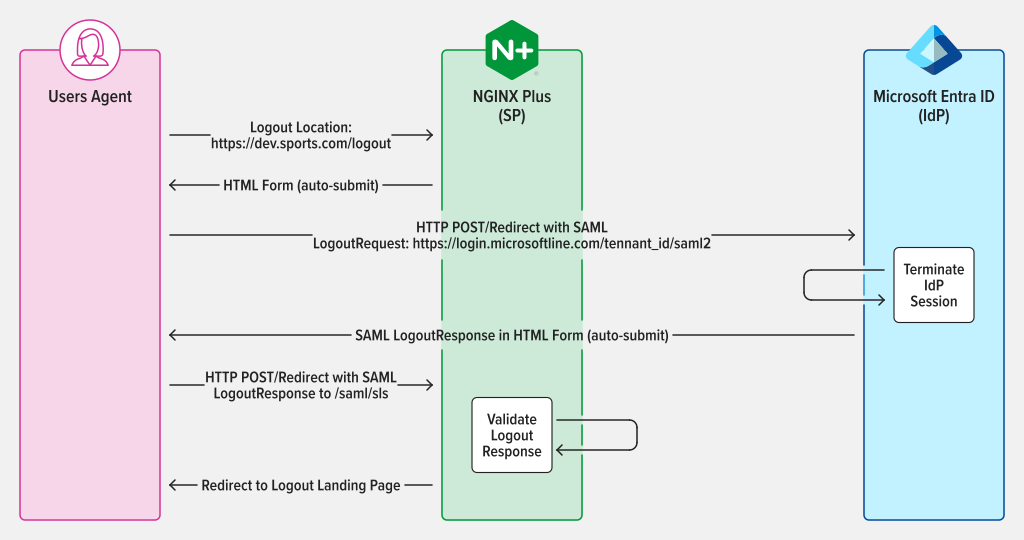
図11:LogoutRequestおよびLogoutResponseにPOST/リダイレクトバインディングを使用するSAML SP起点SLO
セッションの認証後、SPに設定したログアウトURLにアクセスしてログアウトします。たとえば、NGINX PlusでログアウトURLとして「https://dev.sports.com/logout」を設定している場合は、そのURLをブラウザーのアドレスバーに入力します。
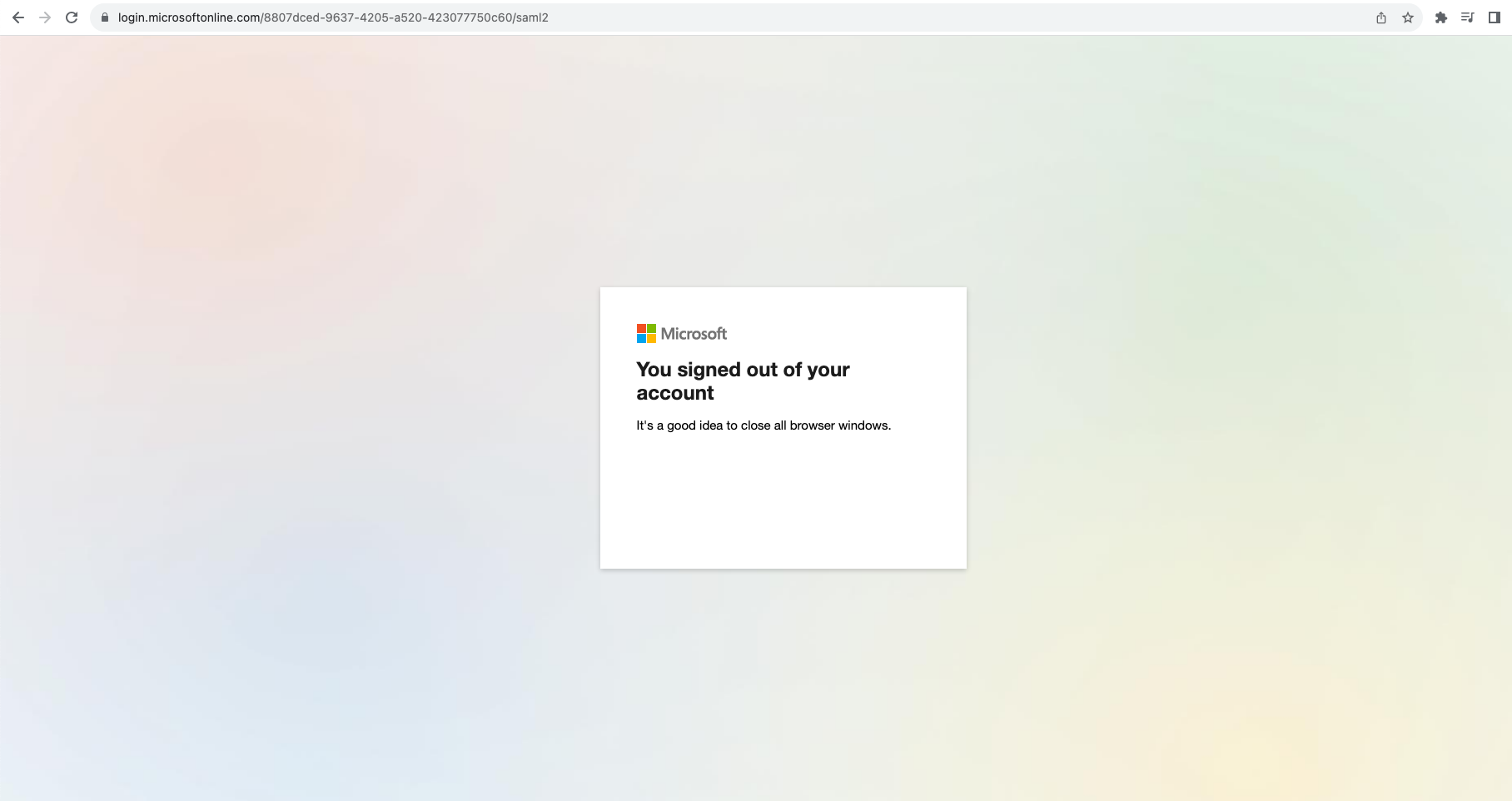
図12:セッションからのログアウト成功
安全にログアウトするには、SPがSAMLリクエストを開始し、そのリクエストをIdPが検証して処理する必要があります。これによりユーザーのセッションが終了し、IdPはSAMLレスポンスを送信して、ユーザーのブラウザーをSPにリダイレクトします。
まとめ
おめでとうございます。NGINX PlusをSAML SPとして使用できるようになり、認証プロセスのセキュリティと利便性がさらに向上します。この新機能はNGINX Plusにとって大きな前進であり、セキュリティと効率性を重視する組織に、より堅牢で汎用性の高いソリューションを提供します。
NGINX PlusでのSAMLの使用について詳しく見る
NGINX Plusの30日間無料トライアルを開始すれば、今すぐNGINX PlusでSAMLを利用できます。ぜひご活用いただき、ご意見をお寄せください。
SAMLを使用するNGINX Plusの詳細については、以下のリソースをご覧ください。
著者について

関連するブログ記事

チュートリアル:NGINXを使用してアプリケーション向けにOpenTelemetryを構成する
OpenTelemetryを使用してNGINXサーバーの状態と健全性をより明確に把握することで、問題のトラブルシューティングを行い、Webアプリケーションのパフォーマンスを向上できます。
AkitaのNGINX Plus認定モジュールでAPIエンドポイントの問題を特定・修正
Akita SoftwareのAPIオブザーバビリティ向け新しいNGINX Plus Certified Moduleを活用して、APIエンドポイントの問題をより迅速に特定し、修正できます。
JavaプロジェクトをスキャフォールディングしてKubernetesネイティブアプリを構築する方法
Red HatのシニアプリンシパルデベロッパーアドボケイトであるDaniel Oh氏が、Javaプロジェクトをゼロから構築するためのひな形を作成し、Kubernetesネイティブアプリケーションとしてビルドする方法を解説します。
F5 NGINXaaS for Azureのご紹介:Microsoft Azureでネイティブに利用できるSaaS型ロードバランシング
NGINXaaS for Azureは、NGINX PlusをAzureネイティブのSaaSとして利用できるサービスです。NGINXの設定を容易にリフト&シフトできるため、クラウド導入とモダンアプリの展開を加速できます。

SELinuxでNGINXおよびNGINX Plusを使用する
Red Hat Enterprise Linux(RHEL)および関連ディストリビューションでSecurity-Enhanced Linux(SELinux)を有効にすると、デフォルト設定によりNGINXとNGINX Plusの一部の操作が制限されます。この記事では、すべての機能を利用できるようにSELinuxの設定を変更する方法について説明します。
NGINX PlusによるAWS Auto Scalingグループの負荷分散
新しいnginx-asg-sync統合ソフトウェアにより、NGINX PlusはAWS Auto Scalingグループの負荷を直接分散できるため、クラウドでの負荷分散がさらに柔軟になります